
Password Information
For years we have been told to make our passwords "hard to guess" by mixing uppercase and
lowercase letters, include numbers and punctuation characters, etc. The main advocates of this practice
was NIST (National Institute of Standards and Technology), the US government department that deals
with cybersecurity. In 2017 they published a paper that basically says they got it wrong. You can
read the original paper, along with the 2020 update here:
https://pages.nist.gov/800-63-3/sp800-63-3.html
Do read it if you are sufficiently interested, but the gist of it is that their advice has
caused people to get into some very bad habits with regards to their passwords. The situation has been
exacerbated by well meaning, but ultimately poorly designed code, that forces people to create
passwords that contain different types of characters without really checking how "crackable" the
password is.
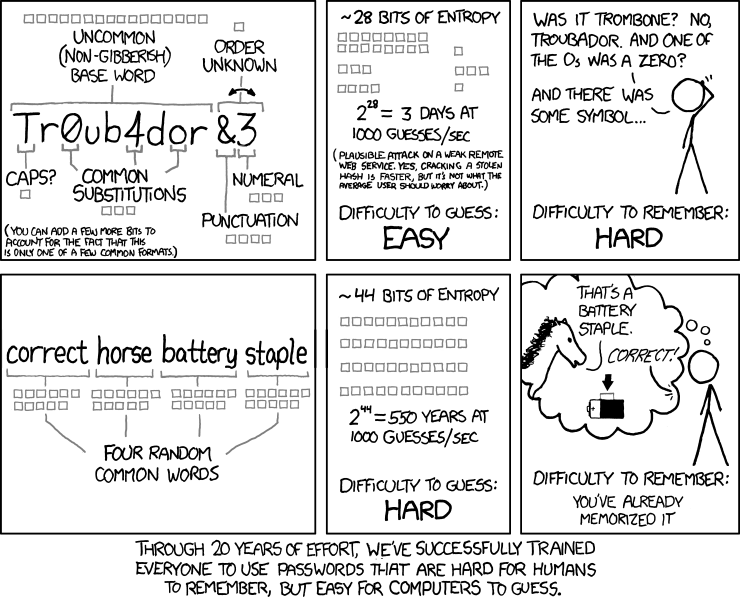
The new advice, and also our advice, is not to use a password at all, instead use a passphrase.
The very word "password" implies one word, whereas several words with spaces between them is
actually way more secure than a single word even with uppercase, lowercase, numbers, etc. So
when you choose a password for this site, pick a short sentence that you will remember, you can make
it all lower case if you prefer, or add one or a few capitals, to be honest it makes very little
difference to the strength of your passphrase, what matters is the length. Here are some
examples of really good passphrases:
- green cows watch purple pigs
- my chair has a wheel dog
- BOTTLES EAT WAVES CAR
- Fish Tunes Speak Easy
- Paint your tea before you drive the car
The point is that you come up with a short phrase that makes no real sense but is easy to
remember. Do not use phrases from published literature, make it up yourself. Do not make it too long,
about 4 to 8 words is about right. Use all lowercase or all uppercase if it helps you remember it
better.
https://xkcd.com/
This site has several mechanisms to protect against hackers trying to break in, so do not be
surprised if you get locked out if you enter an incorrect password several times in a row. If
you do get locked out, try again later as the lockout will time out, or use the password reset
feature, this will allow you to set a new password and it resets any lockout at the same time.
If you do forget your password just use the reset feature, please do not contact us to ask what
your password is, we have no way of looking it up for you. When you set your password it is not
stored anywhere, instead the system runs a mathematical algorithm on it called a "hash", this
creates a fingerprint of your password and it is this fingerprint that is stored in the
database. When you login it runs the same algorithm on the password you type in and compares the
fingerprint with the one stored in the database, if they match, you are granted access.
When you enter a password, we won't ask you to enter it twice, once is enough. However, we do
offer the option to 'Show Password' so you can be certain you entered it correctly. Just check
no-one is looking over your shoulder before you check that box, and uncheck it once you're happy
with what you typed.